蓝牙耳机-白色盒子说明书
说明书图片
图片识别文字
以下文字由本地 OCR 自动识别,可能有误,请以原图为准。
第 1 页
shift
command
option
control
option
command
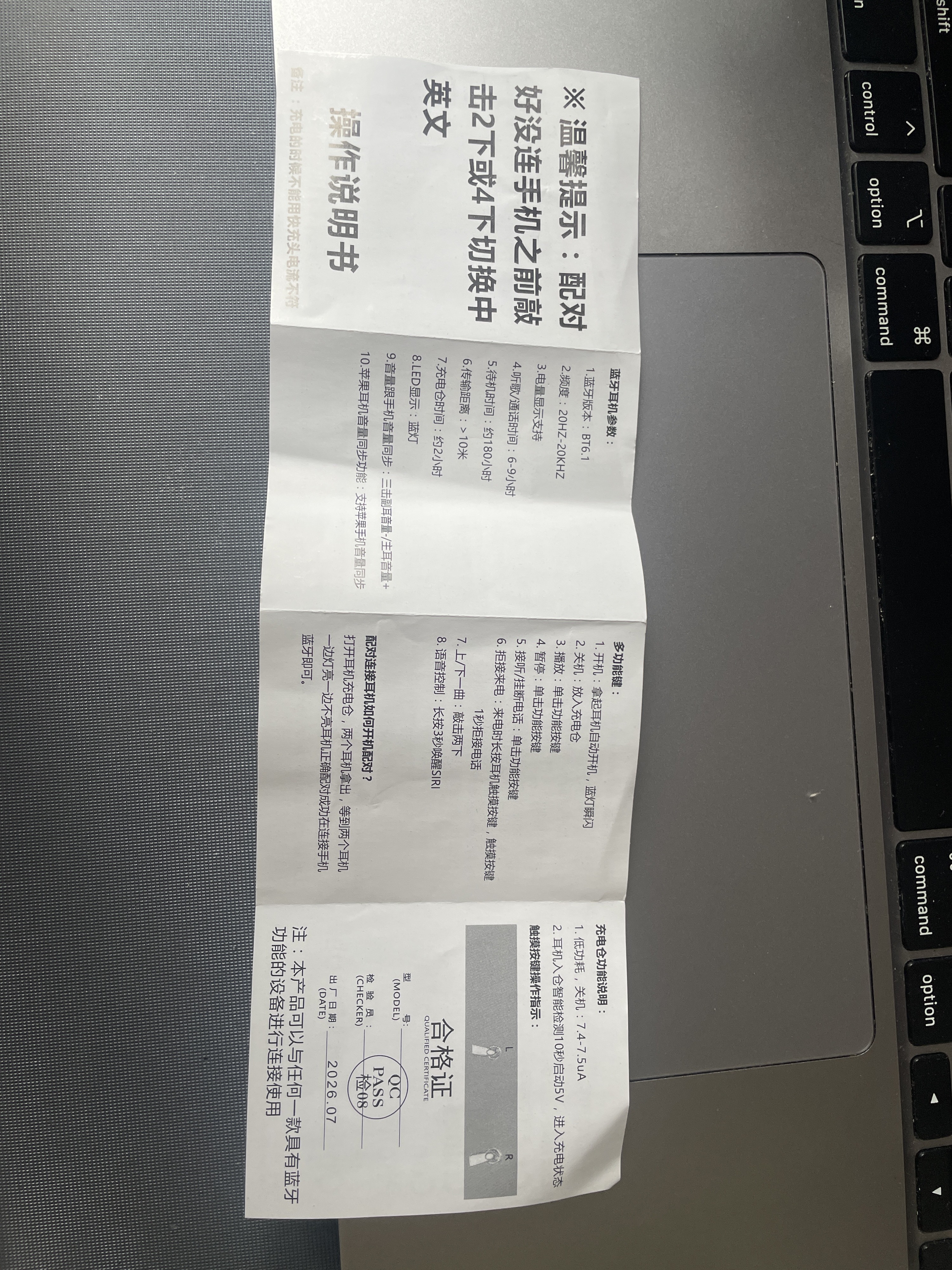
温馨提示:配对
好没连手机之前敲
击2下或4下切换中
英文
蓝牙耳机参数:
- 蓝牙版本:BT6.1
- 频度:20HZ-20KHZ
- 电量显示支持
- 听歌/通话时间:6-9小时
- 待机时间:约180小时
- 传输距离:>10米
- 充电仓时间:约2小时
- LED显示:蓝灯
- 音量跟手机音量同步:三击副耳音量-/主耳音量+
- 苹果耳机音量同步功能:支持苹果手机音量同步
多功能键:
- 开机:拿起耳机自动开机,蓝灯瞬闪
- 关机:放入充电仓
- 播放:单击功能按键
- 暂停:单击功能按键
- 接听/挂断电话:单击功能按键
- 拒接来电:来电时长按耳机触摸按键,触摸按键1秒拒接电话
- 上/下一曲:敲击两下
- 语音控制:长按3秒唤醒SIRI
充电仓功能说明:
- 低功耗,关机:7.4-7.5uA
- 耳机入仓智能检测10秒启动5V,进入充电状态
触摸按键操作指示:
操作说明书
贪注:充电的时候不能用快充头电流不符
配对连接耳机如何开机配对?
打开耳机充电仓,两个耳机拿出,等到两个耳机
一边灯亮一边不亮耳机正确配对成功在连接手机
蓝牙即可。
合格证
QUALIFIED CERTIFICATE
(MODEL)
验员:
(CHECKER)
QC
PASS
检08
出厂日期:
(DATE)
2026.07
注:本产品可以与任何一款具有蓝牙
功能的设备进行连接使用
查看原始识别文字(核对用)
shift
command
option
control
option
command
温馨提示:配对
好没连手机之前敲
击2下或4下切换中
英文
蓝牙耳机参数:
1.蓝牙版本:BT6.1
2.频度:20HZ-20KHZ
3.电量显示支持
4.听歌/通话时间:6-9小时
5.待机时间:约180小时
6.传输距离:>10米
7.充电仓时间:约2小时
8.LED显示:蓝灯
9.音量跟手机音量同步:三击副耳音量-/主耳音量+
10.苹果耳机音量同步功能:支持苹果手机音量同步
多功能键:
1.开机:拿起耳机自动开机,蓝灯瞬闪
2. 关机:放入充电仓
3.播放:单击功能按键
4.暂停:单击功能按键
5.接听/挂断电话:单击功能按键
6.拒接来电:来电时长按耳机触摸按键,触摸按键
1秒拒接电话
7.上/下一曲:敲击两下
8.语音控制:长按3秒唤醒SIRI
充电仓功能说明:
1.低功耗,关机:7.4-7.5uA
2.耳机入仓智能检测10秒启动5V,进入充电状态
触摸按键操作指示:
操作说明书
贪注:充电的时候不能用快充头电流不符
配对连接耳机如何开机配对?
打开耳机充电仓,两个耳机拿出,等到两个耳机
一边灯亮一边不亮耳机正确配对成功在连接手机
蓝牙即可。
合格证
QUALIFIED CERTIFICATE
(MODEL)
验员:
(CHECKER)
QC
PASS
检08
出厂日期:
(DATE)
2026.07
注:本产品可以与任何一款具有蓝牙
功能的设备进行连接使用
第 2 页
fn
control
option
00
command
command
option
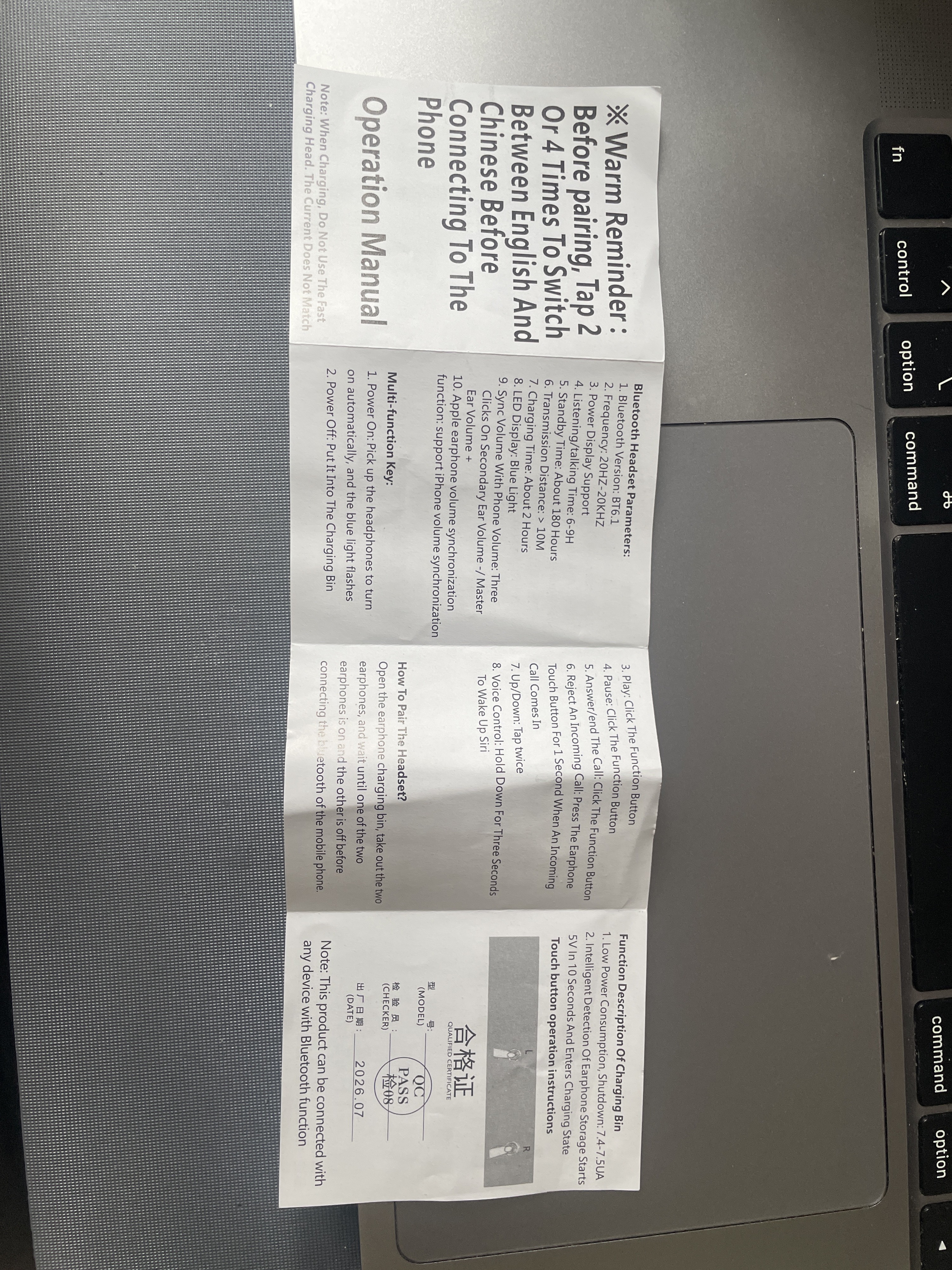
* Warm Reminder:
Before pairing, Tap 2
Or4 Times To Switch
Between English And
Chinese Before
Connecting To The
Phone
Operation Manual
Note: When Charging, Do Not Use The Fast
Charging Head. The Current Does Not Match
Bluetooth Headset Parameters:
- Bluetooth Version: BT6.1
- Frequency: 20HZ-20KHZ
- Power Display Support
- Listening/talking Time: 6-9H
- Standby Time: About 180 Hours
- Transmission Distance:>10M
- Charging Time: About 2 Hours
- LED Display: Blue Light
- Sync Volume With Phone Volume: Three Clicks On Secondary Ear Volume -/ Master Ear Volume +
- Apple earphone volume synchronization function: support iPhone volume synchronization
- Play: Click The Function Button
- Pause: Click The Function Button
- Answver/end The Call: Click The Function Buton
- Reject An Incoming Call: Press The Earphone Touch Button For 1 Second When An Incoming Call Comes In
- Up/Down: Tap twice
- Voice Control: Hold Down For Three Seconds To Wake Up Siri Function Description Of Charging Bin
- Low Power Consumption, Shutdown: 7.4-7.5UA
- Intelligent Detection Of Earphone Storage Starts 5VIn 10 Seconds And Enters Charging State Touch button operation instructions
Multi-function Key:
- Power On: Pick up the headphones to turn on automatically, and the blue light flashes
- Power Off: Put It Into The Charging Bin
How To Pair The Headset?
Open the earphone charging bin, take out the two
earphones, and wait until one of the two
earphones is on and the other is off before
connecting the biuetooth of the mobile phone.
合格证
QUALIFIED CERTIFICATE
P(MODE
(CHECKER)
0C
PASS
检08
出厂日期
(DATE)
2026.07
Note: This product can be connected with
any device with Bluetooth function
查看原始识别文字(核对用)
fn
control
option
00
command
command
option
* Warm Reminder:
Before pairing, Tap 2
Or4 Times To Switch
Between English And
Chinese Before
Connecting To The
Phone
Operation Manual
Note: When Charging, Do Not Use The Fast
Charging Head. The Current Does Not Match
Bluetooth Headset Parameters:
1. Bluetooth Version: BT6.1
2. Frequency: 20HZ-20KHZ
3. Power Display Support
4. Listening/talking Time: 6-9H
5. Standby Time: About 180 Hours
6. Transmission Distance:>10M
7. Charging Time: About 2 Hours
8. LED Display: Blue Light
9. Sync Volume With Phone Volume: Three
Clicks On Secondary Ear Volume -/ Master
Ear Volume +
10.Apple earphone volume synchronization
function: support iPhone volume synchronization
3. Play: Click The Function Button
4. Pause: Click The Function Button
5.Answver/end The Call: Click The Function Buton
6. Reject An Incoming Call: Press The Earphone
Touch Button For 1 Second When An Incoming
Call Comes In
7. Up/Down: Tap twice
8. Voice Control: Hold Down For Three Seconds
To Wake Up Siri
Function Description Of Charging Bin
1. Low Power Consumption, Shutdown: 7.4-7.5UA
2. Intelligent Detection Of Earphone Storage Starts
5VIn 10 Seconds And Enters Charging State
Touch button operation instructions
Multi-function Key:
1. Power On: Pick up the headphones to turn
on automatically, and the blue light flashes
2. Power Off: Put It Into The Charging Bin
How To Pair The Headset?
Open the earphone charging bin, take out the two
earphones, and wait until one of the two
earphones is on and the other is off before
connecting the biuetooth of the mobile phone.
合格证
QUALIFIED CERTIFICATE
P(MODE
(CHECKER)
0C
PASS
检08
出厂日期
(DATE)
2026.07
Note: This product can be connected with
any device with Bluetooth function